Vector Databases Explained: Pinecone vs Weaviate vs Chroma — Pick the Right One
Drowning in AI buzzwords? Cut through the noise. We break down vector databases and pit Pinecone, Weaviate, and Chroma against each other. Pick your champion.
Let’s be blunt: if you’re building anything interesting with AI these days, especially with Large Language Models (LLMs), you’re probably wrestling with data. Not just any data, but data that needs to be understood semantically, contextually. This isn’t your grandpa’s relational database game anymore. This is the era of vector databases, and if you’re not paying attention, you’re already behind.
Forget the hype for a second. At the core of most cutting-edge AI applications – from sophisticated chatbots to hyper-personalized recommendation engines – lies a deceptively simple yet profoundly powerful concept: turning everything into numbers. Specifically, high-dimensional vectors. And then, finding the similar numbers, fast.
That’s where vector databases come in. They’re not just a fancy new toy; they’re the foundational layer for unlocking true semantic understanding and interaction with your data. But with a rapidly evolving landscape, choosing the right one can feel like picking a needle from a haystack, especially when everyone’s screaming about their “revolutionary” solution.
Today, we’re cutting through the noise. We’re going to demystify vector databases, explain why they matter, and then put three heavyweights head-to-head: Pinecone, Weaviate, and Chroma. We’ll talk features, performance, pricing, and, most importantly, when to use each. Because your time is valuable, and mediocrity isn’t an option.
What Exactly is a Vector Database, and Why Should I Care?
Let’s start with the basics. Imagine you have a mountain of text, images, audio, or whatever data you’re dealing with. A traditional database stores this data in structured tables or documents. Great for exact matches, terrible for “find me things like this.”
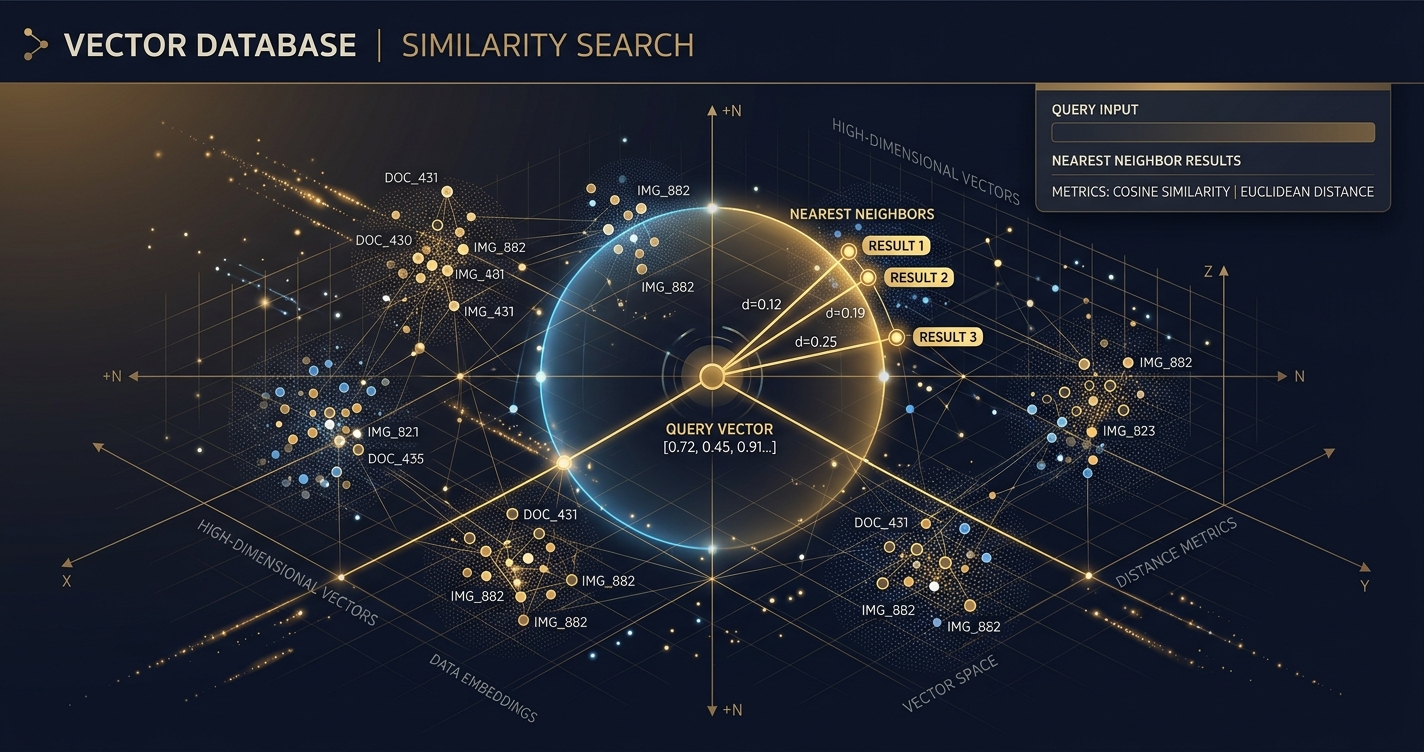
Enter embeddings. An embedding is a numerical representation of a piece of data (text, image, audio, etc.) in a high-dimensional space. Think of it like this: every word, sentence, or even an entire document gets translated into a long list of numbers (a vector). The magic? Data points that are semantically similar (e.g., “king” and “monarch,” or two images of cats) will have vectors that are “close” to each other in this high-dimensional space. “Close” means their numerical values are similar.
Vector databases are purpose-built to store these embeddings and, crucially, perform lightning-fast similarity searches. You give it a query vector (the embedding of your search term), and it quickly finds all the stored vectors that are most similar to it.
Why is This Not Just a Glorified Key-Value Store?
Because traditional databases suck at this. Calculating similarity across thousands, millions, or even billions of high-dimensional vectors in real-time is computationally intense. Vector databases employ specialized indexing algorithms (like Annoy, HNSW, IVF_FLAT, etc. – don’t sweat the acronyms yet) that allow them to find approximate nearest neighbors (ANN) incredibly efficiently, even with massive datasets. They prioritize speed and relevance over exact matches.
How Do Embeddings Actually Work Their Magic?
The process usually looks like this:
- Choose an Embedding Model: This is often a pre-trained neural network (e.g., OpenAI’s
text-embedding-ada-002, Google’s PaLM embeddings, or open-source options like Sentence Transformers). - Generate Embeddings: You feed your raw data (text, images, etc.) into this model. The model outputs a fixed-size vector (e.g., 1536 dimensions for
ada-002). This vector is the embedding. - Store in Vector Database: You store this vector along with the original data (or a reference to it) in your vector database.
- Query: When a user searches, you first generate an embedding for their query.
- Similarity Search: You send this query embedding to the vector database, which then returns the most similar stored vectors and their associated original data.
It’s fundamentally about turning meaning into mathematics.
Where Do Vector Databases Shine? Real-World Use Cases
This isn’t just academic wankery. Vector databases are powering some of the most compelling applications today:
- Semantic Search: Beyond keyword matching. Search for “vehicles that carry people on water” and get results for “boats,” “ships,” “ferries.” This is the cornerstone of modern search.
- Recommendation Systems: “Users who liked this movie also liked these 10 semantically similar movies.” Think Netflix, Amazon, Spotify.
- Retrieval-Augmented Generation (RAG): This is huge for LLMs. Instead of an LLM hallucinating or being limited to its training data, you retrieve relevant, up-to-date context from your own data store (via vector search) and feed it to the LLM. This significantly reduces hallucinations and grounds responses in factual, domain-specific information.
- Anomaly Detection: Finding data points that are “far” from the others can signal fraud, system failures, or unusual activity.
- Image and Video Search: Find images like this one, or video segments containing specific objects or actions.
- Personalization: Tailoring experiences based on user preferences represented as vectors.
Now that we’re clear on the why, let’s dive into the how by dissecting the contenders.
Pinecone: The Managed Enterprise Powerhouse
Pinecone burst onto the scene as one of the first truly managed vector database services. Their pitch is simple: enterprise-grade scalability and performance without the operational headache of managing complex infrastructure. If you’re building at scale and want someone else to handle the heavy lifting, Pinecone is often the first name that comes up.
What Makes Pinecone a Top Contender?
Pinecone is built for serious workloads. Here’s what sets it apart:
- Fully Managed Service: This is their core offering. You don’t deal with servers, scaling, or maintenance. Pinecone handles it all, allowing you to focus purely on your application logic.
- Scalability: Designed from the ground up to handle billions of vectors and millions of queries per second. It automatically scales resources up or down based on your demand.
- Performance: Offers low-latency similarity search even at massive scales. They achieve this with highly optimized indexing algorithms and distributed architecture.
- Filtering Capabilities: Beyond pure vector similarity, Pinecone allows you to filter results based on metadata, which is crucial for precise RAG and semantic search (e.g., “find documents about AI published after 2023 that are similar to this query”).
- Serverless Option: Their newer “serverless” tier promises even greater cost efficiency by only charging for what you use, without needing to provision specific pod types. This is a major change for many.
- Developer Experience: Good documentation, client libraries for Python and Node.js, and a straightforward API.
Is Pinecone Worth the Price Tag? (Pricing & Performance)
Pinecone’s pricing, as of early 2026, reflects its managed, enterprise-focused nature. It’s generally structured around:
- Dimensions: The dimensionality of your vectors. Higher dimensions require more storage and computation.
- Number of Vectors: How many embeddings you store.
- Query Units (QUs) / Serverless Usage: The computational resources consumed by your queries and updates.
Their Starter plan is free for up to 1 index and 50,000 vectors (1536 dimensions or less), which is fantastic for prototyping. Beyond that, their Standard and Enterprise plans are consumption-based. For example, a “p1.x1” pod can store around 1 million 1536-dimensional vectors and handle 10-20 QPS, costing several hundred dollars per month. The new Serverless tier aims to simplify this, charging per vector stored and per operation (read/write), which can be more economical for variable workloads.
Performance: Pinecone consistently delivers low-latency queries, often in the tens of milliseconds, even with large indexes. This is critical for real-time applications like search and recommendations. Their proprietary indexing and distributed architecture are designed for this specific purpose.
When Should You Pick Pinecone?
- You need extreme scalability and reliability: Building a production-grade application that will handle millions or billions of vectors and high query loads.
- You value managed services: You want to offload infrastructure management, scaling, and maintenance entirely.
- You’re working with a large team or enterprise: Pinecone provides the stability, support, and features often required in larger organizations.
- You prioritize speed and low latency: Real-time search, recommendations, and RAG are critical for your application.
- Cost is a consideration, but not the only consideration: While not the cheapest, the total cost of ownership (TCO) might be lower than self-hosting and managing a complex open-source solution at scale.
Weaviate: The Open-Source Graph-Native Contender
Weaviate stands out by blending a vector database with a graph-like data model. It’s open-source first, offering both self-hosting flexibility and a managed cloud service. If you love the idea of combining vector search with structured data and potentially complex relationships, Weaviate might be your champion.
What Makes Weaviate a Strong Choice?
Weaviate isn’t just about vectors; it’s about context and connections:
- Open-Source & Cloud-Native: You can self-host it, run it in Docker, Kubernetes, or use their managed Weaviate Cloud. This flexibility is a major draw for many.
- Graph-Like Data Model: Unlike pure vector stores, Weaviate allows you to define a schema and create relationships between objects (vectors). This means you can perform sophisticated queries like “find articles similar to X, written by authors who also wrote articles about Y.”
- Hybrid Search: Combines vector similarity with traditional keyword search (BM25) and metadata filtering. This often yields more relevant results than pure vector search alone.
- Modules System: Weaviate is highly extensible with a modular architecture. It supports various embedding models (Hugging Face, OpenAI, Cohere, etc.), RAG integrations, question-answering, and even multi-modal capabilities (e.g., image-to-text search).
- GraphQL API: Provides a powerful and flexible way to query your data, including vector search, filtering, and traversing relationships.
- Active Community: Being open-source, Weaviate benefits from a vibrant community of developers contributing and providing support.
How Does Weaviate Perform and What’s the Investment?
Pricing: Weaviate Cloud offers a free sandbox tier for basic exploration, then scales up with consumption-based pricing similar to other cloud services, considering storage, data transfer, and query operations. For self-hosting, the software itself is free, but you’re responsible for the underlying infrastructure costs (compute, storage, networking) and operational overhead.
Performance: Weaviate uses the HNSW (Hierarchical Navigable Small World) algorithm for efficient similarity search, which is known for its good balance of speed and accuracy. Performance can vary significantly based on your hardware, index configuration, and dataset size if self-hosting. Weaviate Cloud offers optimized performance, abstracting away these concerns. For complex queries involving graph traversal and hybrid search, performance might be slightly higher than a pure vector search, but the added context often justifies it.
When Should You Pick Weaviate?
- You need flexibility: open-source and managed options: You want the control of self-hosting but appreciate the option of a managed service.
- Your data has rich relationships: If your data naturally forms a graph (e.g., users interacting with products, documents linked to authors), Weaviate’s schema and graph-like querying are incredibly powerful.
- You need hybrid search: Combining semantic similarity with keyword matching and metadata filtering is crucial for your application.
- You value extensibility and a modular approach: You want to easily swap embedding models or integrate various AI capabilities.
- You prefer a GraphQL API: For complex and flexible data interactions.
Chroma: The Lightweight, AI-Native Local Champion
Chroma is the new kid on the block, often lauded for its simplicity and “AI-native” approach. It’s an open-source, Python-first vector database designed for ease of use, local development, and seamless integration with popular AI frameworks like LangChain and LlamaIndex. If you’re prototyping, building smaller applications, or prefer a minimalist Pythonic experience, Chroma is a serious contender.
What Makes Chroma So Appealing?
Chroma’s strength lies in its approachability and tight integration:
- Extremely Easy to Get Started: You can literally
pip install chromadband have a functional vector database running in minutes, often entirely in-memory or on disk locally. This is a massive win for rapid prototyping and local development. - “AI-Native” Design: Built from the ground up with AI workflows in mind. It handles embedding generation internally if you want, integrating directly with various embedding models.
- Python-First: Its API is incredibly Pythonic and intuitive, making it a favorite for data scientists and developers working primarily in Python.
- Lightweight and Embeddable: Can run entirely in-memory, as a persistent local database, or as a client-server model. This makes it perfect for local RAG applications or small-to-medium scale projects.
- Integration with LLM Frameworks: Deeply integrated with LangChain and LlamaIndex, making it trivial to plug into your RAG pipelines.
- Open-Source and Free: No licensing costs, offering maximum control and cost efficiency for self-managed deployments.
Is Chroma Ready for Prime Time? (Pricing & Performance)
Pricing: Chroma is free and open-source. Your only costs are the infrastructure you choose to run it on (if you move beyond in-memory or local disk).
Performance: Chroma’s performance is excellent for its target use cases. For local, in-memory, or small-to-medium disk-based deployments, query latency is very low. It uses HNSW for indexing, similar to Weaviate, providing good speed and accuracy.
However, it’s crucial to understand its current limitations:
- Scalability: While improving, Chroma is not yet designed for the same scale as Pinecone or even a heavily optimized Weaviate cluster. It’s more suited for millions of vectors, not billions, especially in its default local configurations.
- Operational Maturity: As a newer project, its operational tooling, monitoring, and high-availability features are less mature than established enterprise solutions.
- Distributed Deployment: While it supports a client-server architecture, setting up a highly available, fault-tolerant distributed Chroma cluster requires more manual effort compared to a managed service like Pinecone.
When Should You Pick Chroma?
- You’re prototyping or experimenting: Get up and running with vector search in minutes, locally, with minimal setup.
- You’re building small to medium-scale applications: Projects with up to a few million vectors where you control the infrastructure.
- You prefer a Python-native, lightweight experience: Your primary development language is Python, and you value simplicity.
- You need a local-first solution: For offline applications, personal projects, or embedded use cases.
- You’re building RAG with LangChain/LlamaIndex: Its deep integration makes it a natural fit.
- Cost is a primary concern: You want a free, open-source solution and are willing to manage the infrastructure yourself.
Head-to-Head: Pinecone vs Weaviate vs Chroma — The Raw Facts
| Feature | Pinecone | Weaviate | Chroma |
|---|---|---|---|
| Type | Fully Managed Service | Open-Source (Self-Host) & Managed Cloud | Open-Source (Local, Client-Server) |
| Core Offering | High-scale, low-latency vector search | Vector search + structured data (graph-like) | Easy-to-use, AI-native local vector DB |
| Scalability | Billions of vectors, millions QPS (Enterprise) | Billions (Cloud), Millions (Self-Host, optimized) | Millions (Local/Client-Server, growing) |
| Deployment | Cloud-only (SaaS) | Cloud (Weaviate Cloud) or Self-Host (Docker, K8s) | Local (In-memory, Disk), Client-Server |
| Pricing | Free Starter, Consumption-based (Standard/Serverless) | Free (Open-Source), Consumption-based (Cloud) | Free (Open-Source) |
| Metadata Filtering | Yes, robust | Yes, robust + graph-like queries | Yes |
| Hybrid Search | Limited (vector + metadata) | Yes (vector + keyword/BM25 + metadata) | Limited (vector + metadata) |
| API | REST | REST, GraphQL | Python, REST |
| Ease of Use | High (managed) | Medium (self-host), High (managed) | Very High (local/Python) |
| Operational Overhead | None (managed) | High (self-host), None (managed) | Low (local), Medium (client-server deployment) |
| Typical Use Cases | Large-scale RAG, Enterprise Search, Real-time Recs | Complex RAG, Knowledge Graphs, Hybrid Search, Multi-modal | Prototyping, Local RAG, Small Apps, Research |
| Maturity | High (established leader) | High (established, active development) | Medium (rapidly evolving, newer project) |
Performance, Pricing, and the Cost of “Free”
Let’s address the elephant in the room: performance and pricing.
Performance: It’s All Relative
- Raw Speed: For sheer speed at massive scale, Pinecone, with its highly optimized, proprietary indexing and distributed architecture, often holds an edge. It’s built for that specific purpose.
- Contextual Speed: Weaviate, while potentially slightly slower on pure vector ops due to its graph overhead, makes up for it with powerful hybrid search and contextual querying, which can lead to more relevant results faster.
- Local Speed: Chroma, especially in its in-memory or local disk mode, is blazing fast for smaller datasets because it avoids network latency and complex distributed coordination.
The takeaway: Don’t chase benchmark numbers blindly. Consider what kind of performance your specific application needs. Is it raw query speed for billions of vectors, or nuanced search for millions with complex filtering?
Pricing: The Illusion of “Free”
- Pinecone: Transparent consumption-based pricing. You pay for what you use, and you get a fully managed, highly scalable service. For enterprises, the operational cost savings often outweigh the direct software cost.
- Weaviate Cloud: Similar consumption-based model, offering the benefits of managed service with the Weaviate feature set.
- Weaviate (Self-Hosted) & Chroma (Self-Hosted): “Free” software, but you pay for infrastructure (servers, storage, networking) and, crucially, your own time and expertise to deploy, manage, scale, and maintain it. This “total cost of ownership” (TCO) can quickly eclipse managed service fees, especially for high-availability, production-grade deployments.
The takeaway: “Free” often means you’re paying with your own engineering resources. For small projects or prototypes, this is fine. For mission-critical systems, evaluate the true TCO.
The Future is Now: Key Trends in Vector Databases
The space is evolving at light speed, but a few trends are clear:
- Hybrid Search Dominance: Pure vector similarity is good, but combining it with keyword search (sparse vectors) and robust metadata filtering provides the best results. All major players are investing heavily here.
- Multi-Modality: Moving beyond text. Searching images with text queries, or finding videos based on audio cues. Weaviate is strong here with its module system.
- Serverless and Cost Optimization: Reducing idle costs and simplifying scaling for variable workloads is a massive driver. Pinecone’s serverless tier is a prime example.
- Even Deeper LLM Integrations: Expect more direct integrations with LLM frameworks, automated RAG pipelines, and tools that abstract away more of the vector database management.
Frequently Asked Questions
Q1: What is the main difference between a vector database and a traditional database?
A1: A traditional database stores structured data and excels at exact matches or range queries (e.g., “find all users named John”). A vector database stores high-dimensional numerical representations (embeddings) of data and excels at semantic similarity search (e.g., “find all documents related to machine learning”). They answer different types of questions and often complement each other.
Q2: Can I use a traditional database like PostgreSQL or Elasticsearch for vector search?
A2: Yes, to some extent. Extensions like pgvector for PostgreSQL or built-in vector search in Elasticsearch (and OpenSearch) allow you to store and query vectors. However, they are generally not as performant or scalable as purpose-built vector databases for very large datasets or high query loads, as their core architecture isn’t optimized for ANN algorithms. They can be a good starting point for smaller projects or if you want to consolidate infrastructure.
Q3: What is RAG, and how do vector databases fit in?
A3: RAG stands for Retrieval-Augmented Generation. When an LLM generates a response, it typically relies only on its pre-trained knowledge. With RAG, you first retrieve relevant external information (e.g., from your company’s documents, a knowledge base) using a vector database. This retrieved context is then augmented to the LLM’s prompt, allowing it to generate more accurate, up-to-date, and grounded responses, significantly reducing hallucinations.
Q4: Which embedding model should I use?
A4: The choice of embedding model depends on your data, language, and performance needs. Popular options include:
- OpenAI’s
text-embedding-ada-002: Excellent general-purpose embeddings, easy to use, but proprietary and comes with a cost per token. - Hugging Face models (e.g., Sentence Transformers): Many open-source models available, offering flexibility for specific domains or languages, and free to use once downloaded.
- Cohere Embed: Another strong proprietary option known for good performance. The key is to experiment and choose a model that produces semantically meaningful embeddings for your specific data.
Q5: What is the biggest challenge when working with vector databases?
A5: One of the biggest challenges is ensuring the quality of your embeddings. If your embeddings don’t accurately capture the semantic meaning of your data, your similarity search results will be poor, regardless of how fast your vector database is. Other challenges include managing high-dimensional data, choosing the right indexing algorithm (if self-hosting), and optimizing queries for both speed and recall.
Q6: Can I switch vector databases later if my needs change?
A6: Yes, but it requires effort. While the core concept of storing and querying vectors is similar, the APIs, data models (especially for Weaviate), and deployment strategies vary significantly. You’ll likely need to rewrite your data ingestion and querying logic, and potentially re-embed your entire dataset. It’s best to consider your long-term needs and scalability requirements upfront to minimize migration pain.
Final Verdict: Pick Your Weapon Wisely
So, what’s the right choice? It’s not about “the best” vector database; it’s about the best vector database for your specific problem.
-
For the serious enterprise player, the “don’t make me think about infra” crowd, and those building at massive scale: Pinecone is your battle-tested, managed powerhouse. It’s the premium, reliable choice when you need to focus purely on application logic and expect rock-solid performance.
-
For the data-rich, relationship-focused builder who values open-source flexibility and powerful contextual querying: Weaviate is your versatile workhorse. Its graph-like capabilities and hybrid search offer a deeper, more nuanced approach to data interaction. Choose between their managed cloud or roll your own.
-
For the rapid prototyper, the local-first developer, and the cost-conscious individual building smaller, focused applications: Chroma is your agile, lightweight champion. It gets you from zero to vector search in record time, making it ideal for experimentation and tightly integrated Python projects.
The vector database landscape is dynamic, but these three represent distinct philosophies and target markets. Understand your needs, assess your resources, and then pick the tool that empowers you to build, not just to manage. Now go forth and build something truly intelligent.
Sources
> Want more like this?
Get the best AI insights delivered weekly.
By subscribing, you agree to our Privacy Policy. You can unsubscribe at any time.
> Related Articles
Autonomous Business Agents Need a Control Plane Before They Need More Tools
Pion's research preview connects persistent agents to business systems. Evidence from real vending, retail, and cafe trials shows why monitoring and bounded authority are the core product.
AI Systems Need Three Trust Layers: Verifiable Work, Managed Permissions, and Private Credentials
A cipher-solving agent, GitHub's enterprise controls, and Signal's zkgroup work point to the same production lesson: intelligence needs enforceable trust boundaries.
RAG Query-Rewriting Evaluation: Prove the Rewrite Finds Better Evidence
Query rewriting often sounds smarter while retrieving worse evidence. Evaluate rewrites against relevant documents, failure slices, and final grounded answers before shipping them.
Tags
> Stay in the loop
Weekly AI tools & insights.