Build an AI Content Pipeline: Automate Blog Writing Without Losing Your Soul
Tired of the content grind? Learn how to automate your blog writing with AI, from research to publishing, without sacrificing quality or authenticity.
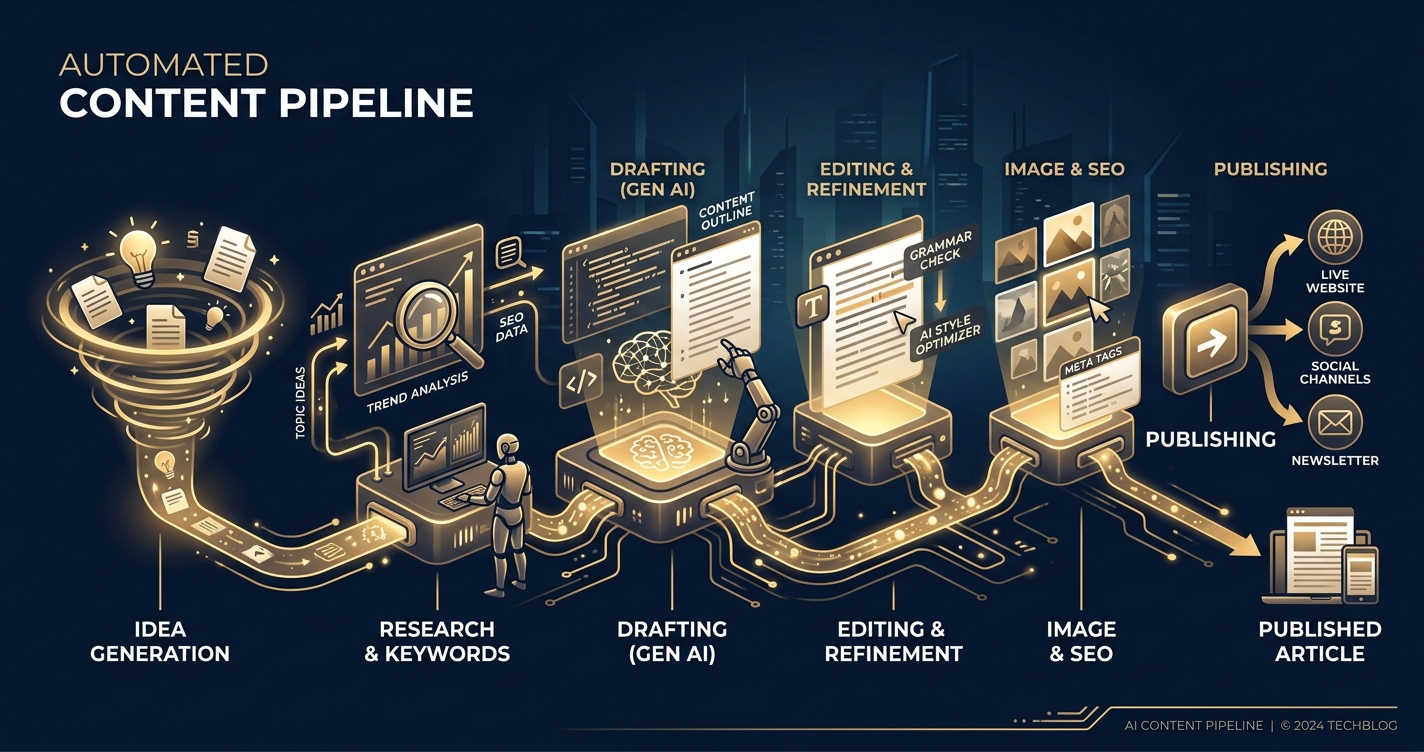
Let’s cut the corporate fluff: you’re here because you’re drowning in content demands and you’ve heard AI can help. You’re also smart enough to know that blindly spitting out AI-generated garbage is a fast track to SEO oblivion and brand irrelevance. You want scale, but you don’t want to become a soulless content farm.
Good. Because this isn’t about replacing your brain with an algorithm. It’s about building a robust, intelligent AI content pipeline that amplifies your efforts, automates the grunt work, and frees you to focus on the strategic, human-centric aspects of content creation. We’re talking about a workflow that takes you from raw topic ideation to polished, published articles, all while maintaining quality, relevance, and your precious sanity.
Buckle up. We’re going to build an AI content pipeline that actually works.
Is AI Content Just SEO Spam?
Let’s get this out of the way. Yes, a significant portion of AI-generated content is spam. It’s the digital equivalent of that unsolicited email trying to sell you dubious pharmaceuticals. It’s generic, repetitive, often factually incorrect, and completely devoid of anything resembling a unique voice or useful insight.
But that’s not the AI’s fault. That’s the fault of lazy operators who treat AI like a magic content button, rather than a powerful tool. AI, especially advanced Large Language Models (LLMs) like GPT-4 and Claude 3 Opus, are sophisticated pattern-matching and text-generation engines. They excel at processing vast amounts of information, identifying relationships, and structuring coherent narratives.
What Are the Real Benefits of Content Automation?
When wielded correctly, AI-powered automation isn’t about creating more mediocre content. It’s about creating more, better content with less manual effort.
- Scale: Imagine producing 10 high-quality articles a week instead of 2. Or 50 instead of 10. This isn’t just a hypothetical; it’s achievable with a well-oiled pipeline.
- Efficiency: Automate the repetitive, time-consuming tasks: initial research, outline generation, first drafts, even basic proofreading. This frees up human writers and editors for higher-value activities like fact-checking, adding unique insights, developing a strong brand voice, and strategic planning.
- Consistency: AI can help maintain a consistent tone, style, and structure across a large volume of content, especially when provided with clear style guides and prompting.
- Speed: Go from idea to draft in minutes, not hours. This drastically reduces your content cycle time, allowing you to react faster to market trends or capitalize on fleeting SEO opportunities.
- Cost Reduction: While there are subscription costs for tools, the overall cost per article can drop significantly compared to purely manual processes, especially for high-volume content needs.
This isn’t about replacing humans; it’s about making humans superhuman.
How Do You Find Topics That Don’t Suck?
The biggest trap in AI content generation is feeding it garbage. If your initial research and topic ideation are weak, your output will be weak, no matter how advanced your LLM. This is where your human intelligence and strategic thinking are paramount.
What Tools Supercharge Keyword Research?
Forget guessing. Data is king. These tools provide the empirical evidence you need to target topics that actually have an audience and search potential.
- Ahrefs (Starts ~$99/month for Lite): A powerhouse for keyword research, competitor analysis, and backlink auditing. Use it to find high-volume, low-difficulty keywords, analyze what your competitors are ranking for, and discover content gaps. Its Content Gap feature is particularly useful for finding keywords your rivals rank for but you don’t.
- SEMrush (Starts ~$129.95/month for Pro): Similar to Ahrefs, SEMrush offers extensive keyword research, domain analysis, and content marketing toolkits. Its Topic Research tool can quickly generate a plethora of ideas based on a seed keyword, showing related questions, headlines, and common themes.
- Surfer SEO (Starts ~$89/month for Basic): While excellent for content optimization (more on this later), Surfer also has a robust Keyword Research tool that groups related keywords into clusters, making it easier to plan comprehensive content strategies.
- Frase.io (Starts ~$14.99/month for Solo): Frase is often praised for its ability to quickly generate content briefs and outlines, but its topic research capabilities are solid. It pulls questions and topics from search results and “People Also Ask” sections, which are goldmines for understanding user intent.
Actionable Advice: Don’t just pick keywords based on volume. Look for user intent. Are people asking questions? Are they looking for tutorials? Product reviews? Match your content type to the intent.
Can AI Generate Truly Original Ideas?
Yes, but it needs a kickstart. AI isn’t going to invent the next groundbreaking scientific theory, but it can find novel connections and angles within existing data.
Using LLMs for Brainstorming & Topic Clustering: Once you have a list of core keywords from your SEO tools, feed them into an LLM like GPT-4 or Claude 3 Opus.
Prompt Example:
"You are an expert content strategist for a tech blog specializing in AI. I have a list of target keywords: [list your keywords here, e.g., 'AI content generation tools', 'automated blog writing workflow', 'prompt engineering for SEO', 'AI content ethics'].

Your task is to:
1.  Group these keywords into logical content clusters.
2.  For each cluster, suggest 3-5 unique, compelling blog post titles that go beyond the obvious. Focus on unique angles, problem-solving, or slightly controversial takes.
3.  For each suggested title, provide a 1-sentence hook that would make a reader click.
4.  Identify any potential content gaps or related sub-topics that aren't covered by the initial keywords but are highly relevant to the overall theme."
This approach leverages the AI’s ability to find relationships and generate creative variations, saving you hours of mental heavy lifting.
How Do You Structure a Compelling Article Automatically?
A strong outline is the skeleton of a great article. Without it, you’re just a pile of words. AI can become your most efficient outline architect.
What’s the Best Way to Prompt for Outlines?
Specificity is your friend. Don’t just say “write an outline.” Tell the AI what kind of outline you need, who your audience is, and what goals the article should achieve.
Prompt Example (for GPT-4 or Claude 3 Opus):
"You are an expert SEO content creator and editor for EgoistAI, a bold, direct, and slightly irreverent tech blog aimed at smart entrepreneurs and tech professionals.

I need a comprehensive, H2/H3 question-based outline for a blog post titled: 'Building an AI Content Pipeline: Automate Blog Writing Without Losing Your Soul'.

Target Audience: Digital marketers, content managers, solo entrepreneurs, and tech writers looking to scale their content efforts with AI without sacrificing quality.

Goal: To provide a practical, actionable guide to setting up an automated AI content workflow.

Key Information to Cover:
-   Dispelling myths about AI content being spam.
-   Benefits of automation (scale, efficiency, consistency).
-   Tools for research (Ahrefs, SEMrush, Surfer, Frase).
-   Prompting strategies for outlines and drafts.
-   LLMs for drafting (GPT-4, Claude 3 Opus).
-   Human role in editing, fact-checking, and adding unique insights.
-   Automation tools (Zapier, Make.com) for workflow integration.
-   Ethical considerations and maintaining authenticity.

Structure Requirements:
-   Use only H2 and H3 headings.
-   All headings must be question-based (e.g., '## What is X?', '### How does Y work?').
-   Include an introduction and a conclusion.
-   Suggest key points or sub-sections for each H2 and H3.
-   Ensure logical flow and depth suitable for a 1500-2500 word article.
-   Maintain a bold, direct, slightly irreverent tone in the heading questions."
This detailed prompt ensures the AI understands the context, audience, and stylistic requirements, leading to a much more usable outline.
Can AI Integrate SEO Best Practices into Outlines?
Absolutely. Tools like Surfer SEO and Frase.io are built for this.
- Surfer SEO: After you input your target keyword, Surfer analyzes the top-ranking pages and provides recommendations for content structure, word count, relevant terms to include, and even a suggested outline based on competitor headings. You can use this as a reference or a direct starting point for your AI-generated outline.
- Frase.io: Its “Content Brief” feature is excellent. Input your keyword, and Frase will generate an outline, identify related topics, pull questions from “People Also Ask,” and even suggest statistics. You can then export this or copy-paste relevant sections to refine with your LLM.
Workflow Integration:
- Use Surfer/Frase to generate a data-driven content brief/outline for your target keyword.
- Review this brief and add any unique angles or insights you want to cover.
- Feed this enhanced brief, along with your stylistic and audience requirements, into an LLM to generate the final, question-based outline. This combines data-driven SEO with creative, engaging structure.
How Do You Draft High-Quality Content with AI, Not Just Filler?
This is where many pipelines fail. They treat the drafting phase as a one-shot command. Good AI drafting is an iterative, section-by-section process.
Which AI Models Excel at Long-Form Writing?
Not all LLMs are created equal, especially for long-form, quality content.
- OpenAI’s GPT-4 (via ChatGPT Plus at $20/month or API access): Currently one of the most capable models. It excels at complex reasoning, understanding nuance, and generating creative, coherent text. Its larger context window (e.g., GPT-4 Turbo with 128k tokens) means it can handle entire outlines and extensive background information without “forgetting” earlier parts of the prompt.
- API Pricing: Varies, but GPT-4 Turbo can be around $10 per 1M input tokens and $30 per 1M output tokens. This scales with usage.
- Anthropic’s Claude 3 Opus (via Anthropic API or platforms like Poe): A formidable competitor to GPT-4, often praised for its longer context window (200k tokens), strong reasoning, and ability to follow complex instructions. It can be particularly good at maintaining a consistent persona and tone.
- API Pricing: Opus is more expensive than GPT-4 Turbo, roughly $15 per 1M input tokens and $75 per 1M output tokens.
- Google’s Gemini (Advanced via Google One AI Premium at $19.99/month or API): While catching up, Gemini can also produce good quality. Its strengths often lie in multimodal capabilities, but for pure text generation, GPT-4 and Claude 3 Opus often lead in terms of consistency and adherence to complex instructions.
Actionable Advice: Invest in the best model you can afford. The cost difference between a mediocre model and a top-tier one is negligible compared to the time saved in editing and the potential SEO benefits of higher-quality content.
What’s the Secret to Multi-Stage Drafting?
Don’t try to generate a 2000-word article in one prompt. It will hallucinate, become repetitive, and lose coherence. Break it down.
Iterative, Section-by-Section Drafting:
- Introduction First: Generate the intro. This sets the tone and thesis.
- Section by Section: Take each H2 and H3 from your approved outline. Provide the AI with:
- The overall article title and introduction.
- The specific H2/H3 heading you want it to write.
- Any key points or data you want it to include in that section (from your research).
- Your brand’s tone and style guide.
- A target word count for that section.
- Review and Refine: After each section, review it. Does it flow? Is it accurate? Is the tone correct? Make edits or prompt the AI for revisions before moving to the next section.
- Connect the Dots: Once all sections are drafted, prompt the AI to write transitions between sections, ensuring a smooth flow.
- Conclusion Last: Generate the conclusion, summarizing key takeaways and providing a call to action.
Code Example (Prompting for a Section):
"You are drafting a blog post for EgoistAI titled 'Build an AI Content Pipeline: Automate Blog Writing Without Losing Your Soul'.
The overall introduction is: [Paste your article's introduction here].
The previous section discussed: [Briefly summarize the previous section if relevant for context].

Now, write the content for the H2 heading: '## How Do You Find Topics That Don't Suck?'
Focus on:
-   The critical role of human insight in initial topic ideation.
-   The dangers of weak initial research.
-   Elaborate on the utility of tools like Ahrefs, SEMrush, Surfer SEO, and Frase.io for keyword research, competitor analysis, and content gap identification.
-   Provide actionable advice on choosing keywords based on user intent, not just volume.
-   Maintain the bold, direct, slightly irreverent tone of EgoistAI.
-   Target word count for this section: 250-350 words."
This meticulous approach ensures quality and reduces the “AI-ness” of the final draft.
Is Human Editing Still Necessary for AI-Generated Drafts?
Unequivocally, YES. Anyone telling you otherwise is selling you snake oil. AI drafts are drafts. They are not final, publishable content.
How Can AI Assist in the Editing Process?
While a human must be the final arbiter, AI can significantly speed up the editing process.
- Grammar and Style Checks: Tools like Grammarly Premium (starts ~$12/month) and Hemingway Editor (one-time desktop app purchase ~$20) are invaluable. They catch grammatical errors, suggest stylistic improvements, identify passive voice, and improve readability.
- Rephrasing and Summarization: Feed awkward sentences or verbose paragraphs back into your LLM. Prompt it to “rephrase this paragraph to be more concise and direct” or “summarize this section in two bullet points.”
- Tone Adjustment: If a section feels off-brand, ask the AI: “Rewrite this section to better match a bold, direct, and slightly irreverent tone.”
- Fact-Checking (Assisted): While AI can’t “fact-check” in the human sense, you can prompt it with specific factual claims from its output and ask it to “provide a verifiable source or data point for this claim: [claim].” This can sometimes reveal hallucinations or prompt you to do your own verification.
- Plagiarism Checkers: Use tools like Copyscape (paid per search) or included features in Surfer SEO/Frase to ensure the AI hasn’t inadvertently reproduced content from the web.
What’s the Role of SEO Optimization Post-Drafting?
This is where you turn a good draft into a high-ranking article.
- Surfer SEO / Frase.io (Content Editor): These tools are designed for on-page optimization. Paste your AI-generated draft into their content editor. They will provide a real-time “content score” and suggest:
- Missing keywords and phrases from top-ranking competitors.
- Optimal word count.
- Suggestions for heading structure.
- Internal and external linking opportunities.
- NLP (Natural Language Processing) terms to include.
- You can even use the AI writing features within these tools to generate additional paragraphs based on their recommendations.
- Internal Linking: Crucial for SEO. Identify relevant older articles on your site and link to them naturally within your new content. This spreads “link juice” and improves user experience.
- Schema Markup: Use tools or plugins (e.g., Rank Math or Yoast SEO for WordPress) to add structured data (FAQ schema, how-to schema, article schema). This helps search engines understand your content better and can lead to rich snippets in SERPs.
- Image Optimization: Ensure images are relevant, compressed for fast loading, and have descriptive alt text (which AI can help generate).
Actionable Advice: Don’t skip the SEO optimization step. A perfectly drafted article that isn’t optimized for search might as well not exist.
How Do You Connect All These Disparate Tools?
This is the “pipeline” part of the content pipeline. Manual copy-pasting is for amateurs. Automation platforms are your content factory floor.
What Are the Best Automation Platforms?
These tools act as the glue between all your content creation steps. They allow you to define triggers and actions, creating powerful automated workflows (often called “Zaps” in Zapier or “Scenarios” in Make.com).
- Zapier (Starts ~$20/month for Starter): The veteran of automation, Zapier boasts an extensive library of integrations (5,000+ apps). It’s user-friendly, with a straightforward “If This, Then That” logic. Great for beginners due to its intuitive interface.
- Make.com (formerly Integromat) (Starts ~$9/month for Core): Often considered more powerful and flexible than Zapier, especially for complex, multi-step workflows. Make allows for more intricate branching logic, error handling, and data manipulation. It has a visual builder that’s excellent for seeing the entire workflow at a glance. It often offers more “operations” (tasks) for a lower price point than Zapier.
- n8n (Open-source, Cloud starts ~$20/month): For the technically inclined, n8n is an open-source alternative that you can self-host. It offers incredible flexibility and powerful integrations, including the ability to run custom code. Its cloud version provides a managed service.
Can AI Automate Content Distribution and Promotion?
Yes, within limits. AI can certainly assist, but human oversight for strategy and nuance is still key.
- Social Media Scheduling: Once an article is published, you can set up automations to:
- Trigger a post to your social media channels (Twitter, LinkedIn, Facebook) via Zapier/Make, using pre-written templates or AI-generated variations of your article’s title and excerpt.
- Integrate with tools like Buffer or Hootsuite for scheduling and managing posts.
- Email Marketing Integration: Automatically add new article links to your newsletter queue or trigger a “new post alert” email to your subscribers.
- Internal Linking Suggestions: While you’ll perform initial internal linking during optimization, you could train a custom AI model (or use a sophisticated prompt) to suggest additional relevant internal links for older posts based on the new article’s content.
Actionable Advice: Start simple with automation. Automate the handoffs between tools first (e.g., “when draft complete in Google Docs, create a task in Asana and notify editor”). Then expand to publishing and promotion.
AI Content Workflow Automation Tools Comparison
| Feature | Zapier | Make.com (Integromat) | n8n |
|---|---|---|---|
| Ease of Use | Very high, beginner-friendly | High, but steeper learning curve than Zapier | Medium, best for technical users |
| Integrations | 5,000+ apps | 1,500+ apps, but growing rapidly | 400+ nodes, plus custom code/HTTP requests |
| Workflow Design | Linear “If This, Then That” | Visual, drag-and-drop, complex branching | Visual, highly customizable nodes |
| Cost (Entry) | Free tier, paid starts ~$20/month | Free tier, paid starts ~$9/month | Free (self-hosted), Cloud starts ~$20/month |
| Power/Flexibility | Good for common tasks | Excellent for complex, multi-step scenarios | Exceptional, highly customizable, code-friendly |
| Data Handling | Good, but can be limited for complex ops | Very strong, advanced data manipulation | Extremely strong, full control |
| Use Case | Quick, simple automations | Complex, data-rich workflows | Technical projects, custom integrations, self-hosting |
How Do You Ensure Authenticity and Avoid Becoming a Content Farm?
This is the “without losing your soul” part. The technology is just a tool. Your ethics, your brand, and your human touch define your output.
What Are the Pitfalls of Over-Automation?
Blindly automating everything leads to a predictable set of problems:
- Generic Content: If you don’t inject unique insights, a strong voice, or original research, your content will sound like every other AI-generated article out there – bland, forgettable, and ultimately useless.
- Lack of Unique Voice: Your brand has a personality. AI can mimic, but it can’t invent that personality without deep, consistent guidance and human refinement. Over-automation dilutes your unique selling proposition.
- Factual Errors & Hallucinations: LLMs are confident liars. They will present falsehoods with the same conviction as truth. Without human fact-checking, you risk publishing misinformation, eroding trust and credibility.
- SEO Penalties: Google’s algorithms are increasingly sophisticated at identifying low-quality, spammy, or purely AI-generated content that offers no real value. While Google says AI content is fine if it’s helpful, unedited AI content rarely is.
- Legal & Ethical Headaches: Plagiarism (even accidental), copyright infringement, or using data without proper consent are real risks if you’re not careful.
Why Is Human Oversight Non-Negotiable?
Because you’re not just publishing words; you’re building a brand and serving an audience.
- Fact-Checking: This is paramount. Every single claim, statistic, or piece of data generated by the AI must be independently verified by a human.
- Adding Unique Insights & Expertise: What do you know that the AI doesn’t? What’s your unique perspective? What case studies can you share? This is where your true value lies. Injecting this human element is what elevates your content from generic to exceptional.
- Refining Brand Voice & Tone: While AI can follow instructions, a human editor can ensure the content truly resonates with your brand’s personality, injecting humor, sarcasm, empathy, or authority where appropriate.
- Strategic Direction: AI can execute, but it can’t formulate a content strategy. Humans decide what to write, why to write it, and how it fits into the broader business goals.
- Empathy & Storytelling: AI can describe emotions, but it struggles to truly convey them or tell compelling human stories that connect with an audience on a deeper level.
Your job isn’t to be an AI operator; it’s to be a conductor, orchestrating a powerful symphony of tools and human expertise.
Conclusion
Building an AI content pipeline isn’t about replacing your soul with an algorithm; it’s about making your soul more productive. It’s about shedding the repetitive, soul-crushing tasks that drain your creativity and time. When implemented thoughtfully, with human intelligence guiding every step, AI becomes a force multiplier, allowing you to scale your content efforts, reach new audiences, and maintain quality without sacrificing authenticity.
Stop fighting the future. Stop drowning in the content grind. Start building a smarter, more efficient content pipeline today. Your audience (and your sanity) will thank you.
Frequently Asked Questions
Q1: Can an AI content pipeline truly produce content that ranks well on Google?
A: Yes, but with a significant caveat: the pipeline must be designed for quality and human oversight. Google’s algorithms prioritize helpful, relevant, and high-quality content, regardless of whether AI was used in its creation. If your pipeline includes robust research, iterative drafting, thorough human editing, fact-checking, and comprehensive SEO optimization (using tools like Surfer SEO), then AI-assisted content can absolutely rank well. The danger lies in publishing unedited, low-effort AI output.
Q2: How much does it cost to set up an effective AI content pipeline?
A: The costs vary widely depending on the tools you choose and the scale of your operation. You could start with a budget of $100-$300 per month for essential tools like:
- An LLM subscription (e.g., ChatGPT Plus at $20/month or Claude 3 API credits).
- An SEO content optimization tool (e.g., Surfer SEO Basic at $89/month or Frase.io Solo at $14.99/month).
- An automation platform (e.g., Zapier Starter at ~$20/month or Make.com Core at ~$9/month).
- A grammar/style checker (e.g., Grammarly Premium at ~$12/month). More advanced setups with higher-tier SEO tools (Ahrefs, SEMrush), more LLM API usage, and higher automation platform plans can easily run $500-$1000+ per month.
Q3: How long does it take to build and optimize an AI content pipeline?
A: Setting up the basic tools and connections can take a few days to a week. However, optimizing the pipeline – refining your prompts, integrating new tools, training your team (or yourself) on the workflow, and establishing quality control processes – is an ongoing effort. Expect to spend 1-3 months of iterative testing and refinement to get your pipeline running smoothly and producing consistent, high-quality results. It’s not a “set it and forget it” system.
Q4: Will AI content pipelines replace human writers and editors?
A: No, not entirely. They will, however, transform the roles of human writers and editors. The grunt work (initial drafting, research synthesis, basic outlining) can be largely automated. This frees up humans to focus on higher-value tasks: strategic planning, injecting unique insights, fact-checking, refining brand voice, deep editing, creative direction, and building relationships. Humans will become “AI wranglers” and content strategists, leveraging AI to amplify their capabilities rather than being replaced by it.
Q5: What are the biggest challenges in maintaining a high-quality AI content pipeline?
A: The biggest challenges include:
- Maintaining Quality & Authenticity: Preventing generic, bland, or off-brand content.
- Fact-Checking & Hallucinations: Ensuring accuracy and avoiding the publication of false
> Want more like this?
Get the best AI insights delivered weekly.
By subscribing, you agree to our Privacy Policy. You can unsubscribe at any time.
> Related Articles
Autonomous Business Agents Need a Control Plane Before They Need More Tools
Pion's research preview connects persistent agents to business systems. Evidence from real vending, retail, and cafe trials shows why monitoring and bounded authority are the core product.
AI Systems Need Three Trust Layers: Verifiable Work, Managed Permissions, and Private Credentials
A cipher-solving agent, GitHub's enterprise controls, and Signal's zkgroup work point to the same production lesson: intelligence needs enforceable trust boundaries.
RAG Query-Rewriting Evaluation: Prove the Rewrite Finds Better Evidence
Query rewriting often sounds smarter while retrieving worse evidence. Evaluate rewrites against relevant documents, failure slices, and final grounded answers before shipping them.
Tags
> Stay in the loop
Weekly AI tools & insights.